
How to Set A Stop Loss Order on TradingView
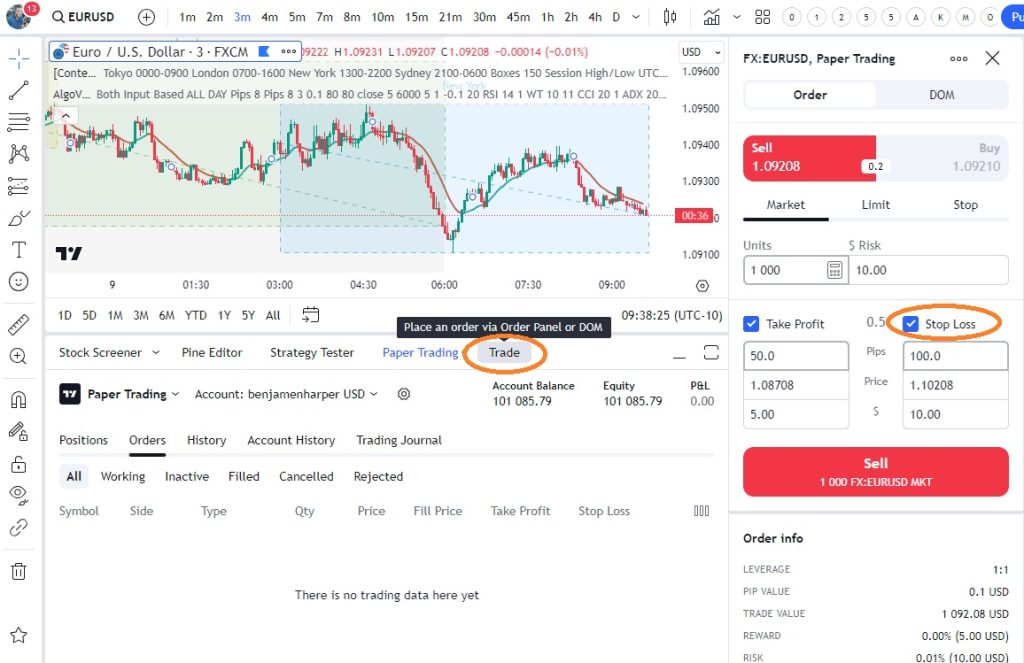
In the world of trading, minimizing losses while maximizing profits is vital. One of the methods that experienced traders employ is the use of Stop-Loss Orders. TradingView, a leading charting platform, offers a user-friendly interface to execute this risk management technique. In this blog post, we will delve into the concept of Stop-Loss Orders, how to set them up on TradingView, and some essential strategies to make the most of this powerful tool.
Understanding Stop-Loss Orders
Stop-Loss Orders, often abbreviated as SL, are conditional orders placed by traders to automatically close a position when the market price reaches a specific level. They act as a safety net, limiting potential losses in volatile market conditions. A properly executed Stop-Loss Order not only minimizes risk but also provides tranquility and discipline during trading activity.
How to Set Up Stop-Loss Orders on TradingView
TradingView’s intuitive interface enables traders to set up Stop-Loss Orders effortlessly. Here’s a step-by-step process to follow:
1. Select the desired instrument: Choose the market or security you intend to trade.
2. Open the Order panel: Look for the “Order” button placed near the trading chart.
3. Specify the trade direction: Determine whether you are entering a long (buy) or short (sell) position.
4. Determine the Stop-Loss price: Analyze the market conditions and select an appropriate price level where you want the Stop-Loss Order to be triggered.
5. Set the Order type: Choose the specific Stop-Loss Order type based on your trading strategy and risk tolerance. Popular options include “Stop Limit” and “Stop Market.”
6. Define quantity and additional settings: Enter the position size and adjust any additional settings, such as order duration or order quantity.
7. Place the Stop-Loss Order: Double-check all the parameters and press the “Place Order” button to execute your Stop-Loss Order.
Strategies to Maximize Stop-Loss Order Effectiveness
To leverage Stop-Loss Orders to their full potential, it is crucial to implement certain strategies:
1. Determine an appropriate Stop-Loss level: Consider technical analysis, support, and resistance levels, as well as recent market trends when setting your Stop-Loss parameters.
2. Utilize trailing stops: TradingView offers an advanced feature called Trailing Stop, which allows your Stop-Loss Order to automatically adjust as the market price moves favorably.
3. Avoid setting Stop-Loss Orders too close: To avoid unnecessary triggering, ensure that your Stop-Loss level provides sufficient room for market fluctuations while adequately limiting risk.
4. Regularly reassess and adjust Stop-Loss levels: As market conditions change, it’s important to periodically review and adjust your Stop-Loss levels to align with the evolving trend or volatility.
Stop-Loss Orders are indispensable tools for managing risks while trading. TradingView offers an easy-to-use platform to set up and manage these orders effectively. By understanding the concept and employing suitable strategies, traders can significantly enhance their trading performance and protect their capital. Start integrating Stop-Loss Orders into your trading routine on TradingView today and stay one step ahead in this dynamic market environment.
