
In the dynamic arena of the financial markets, effective risk management is the keystone of a successful trading strategy. Every seasoned trader understands that securing earned profits while minimizing potential losses is not just an art, but also a science. One such scientific tool that has gained widespread acclaim for its role in portfolio defense is the ‘trailing stop.’ Today, we won’t just explore what trailing stops are but will dive deep into harnessing their power specifically on one of the most robust trading platforms out there, TradingView.
As we embark on this journey, imagine setting a safety net that instinctively moves with your winning trades, securing your gains as the market climbs, yet stands firm if the tides turn unfavorable. That, in essence, is the beauty of the trailing stop. Whether you are an avid day trader glued to the pulse of the stock market, or someone who enjoys the steady pace of longer-term investments, understanding how to implement trailing stops on TradingView can dramatically transform your trading experience.
The goal of this comprehensive guide is not just to impart knowledge, but to arm you with practical strategies to integrate trailing stops into your trading system. By the end of this exploration, you’ll not just comprehend the ‘how,’ but also the ‘why’ behind using trailing stops, cementing your foundation for making informed and strategic decisions on TradingView.
Getting Started with Trailing Stops on TradingView:
Before we set foot on the path of mastering trailing stops, let’s establish what they are. A trailing stop is an order that you can set to automatically adjust itself, maintaining a specified distance from the market price. As the market price moves favorably, the trailing stop moves along with it, trailing by a predetermined percentage or dollar amount. However, should the market price reverse, the trailing stop stays in place, and if the market hits this level, it triggers a sell or buy order, depending on the position you hold.
Now, TradingView is not merely a charting platform; it is an ecosystem that breathes alongside the ebb and flow of financial markets. It doesn’t just offer top-of-the-line charting tools, but it also enables you to utilize trailing stops to safeguard your trades effectively.
Step 1: Familiarize with TradingView’s Interface
Before anything else, you need to become comfortable navigating the TradingView interface. This involves understanding the layout, the location of crucial tools, and setting up your trading chart. Take the time to customize your workspace on TradingView to reflect your preferences, ensuring the trailing stop feature is readily accessible.
Step 2: Set Up a Trade with a Trailing Stop
As you decide on a trade, think carefully about the trailing stop’s distance from the current price. This distance should be informed by the volatility of the asset you’re trading and your risk appetite. On TradingView, you can set up a trailing stop either as a percentage of the current price or as a fixed amount in the asset’s native currency.
To do this, once you’ve identified a trade:
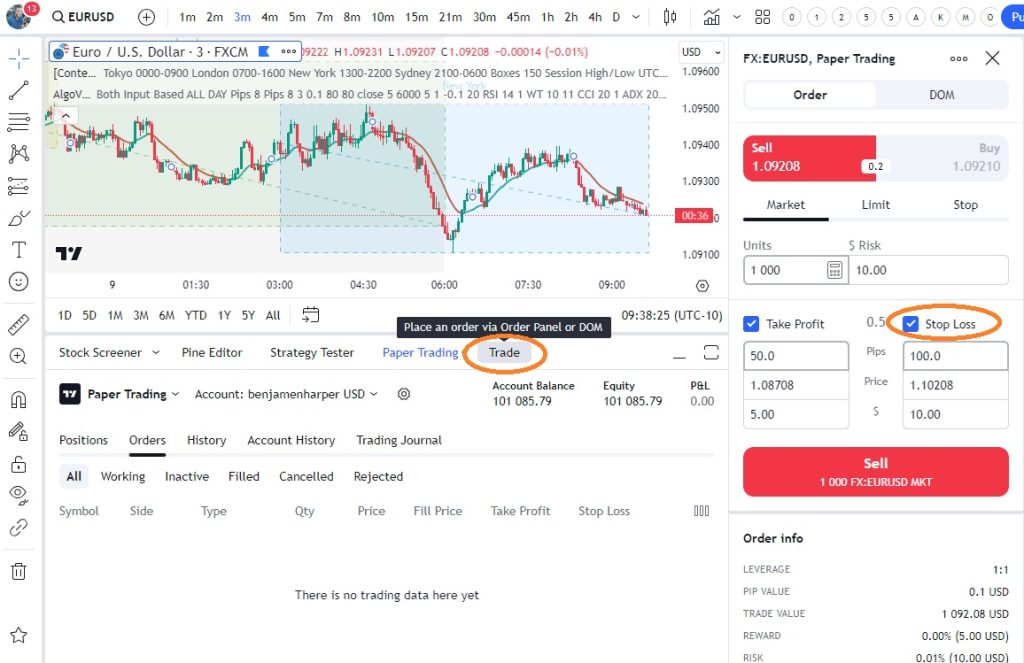
– Enter the ‘Trade’ panel on TradingView, and select ‘New Order.’
– Choose the financial instrument you wish to trade.
– Determine your entry point, and set the desired position size.
– Look for the ‘Stop Loss’ field, and rather than setting a fixed price, opt for a ‘Trailing Stop.’
Step 3: Define Your Trailing Stop Criteria
Decide whether you want your trailing stop to follow the price by a specific percentage or by an exact amount. Each approach has its merits, so your choice should align with your trading strategy. If the asset experiences significant price swings, you may favor a percentage-based stop to allow for more significant movement. For those trading more stable assets, a fixed amount might provide the precision you’re after.
Once your preference is selected, input the desired distance for the trailing stop into the ‘Stop Loss’ area. If you choose the percentage option, remember that a tighter stop can protect profits but also risks stopping you out prematurely during minor price retractions. On the other hand, a wider stop may ride out more volatility, yet at the risk of giving back larger gains if the trend reverses significantly.
Step 4: Monitor Your Trailing Stop’s Behavior
After your trade is live with a trailing stop in place, monitor how it behaves in relation to price action. This is where TradingView’s crisp, real-time charts truly shine. The trails your stop leaves as it ascends with price improvements can be visualized, and its steadfast pause when prices fall evokes confidence in your strategy.
Step 5: Adjust as Necessary
As you grow accustomed to trading with trailing stops, you may find it prudent to adjust your approach based on market conditions or your evolving trading style. Regularly reflect on the effectiveness of your trailing stop settings and don’t hesitate to fine-tune them. Your trailing stop’s flexibility is a core advantage that you should fully capitalize on to suit your needs.
Trailing Stop Strategies on TradingView:
Beyond the mechanics of setting them up, there are strategies to maximize the effectiveness of trailing stops in your trading activities on TradingView. Here’s where we amalgamate the ‘how’ with the ‘why’ and embark on strategy optimization.
1. Percentage-based vs. Fixed Amount
You’ve learned how to set both types of trailing stops, but when should you use one over the other? Consider the percentage-based stop for stocks or instruments with higher volatility as it accounts for the scale of usual movements. Fixed amount stops might be better suited for forex or markets where you’re well-versed in the typical price oscillation scale and wish to define exact exit points.
2. Scaling Out
While the temptation to let winners run is strong, sometimes it’s prudent to lock in profits incrementally, which is known as scaling out. Rather than applying a trailing stop to the full position, apply it to a portion, thereby capturing profits while still allowing some of your positions the chance to benefit from potential continued upward trends.
3. Using ATR to Set Stops
The Average True Range (ATR) indicator measures market volatility. By applying it in your TradingView analysis, you can use this as a gauge to set trailing stops that adapt to the current market environment. If ATR is high, account for larger price swings; if ATR is low, tighten stops to respond to less volatile conditions.
4. Combining Trailing Stops with Technical Analysis
Implement trailing stops in harmony with support and resistance levels, trend lines, and moving averages. If a trailing stop is set too close on a stock bouncing off a support line, you might be stopped out by a false breakout. Use these technical indicators to inform your trailing stop level, creating a more robust strategy.
5. Automate for Discipline
By using the trailing stop functionality, you commit your exit strategy to the discipline of automation, removing emotional decision-making from the equation. Especially in volatile markets, having a trailing stop can help to remove the hesitation that leads to lost opportunity and profits.
Implementing Trailing Stops in Different Market Scenarios:
Understanding when and how to adjust trailing stops based on market scenarios can make the difference between a good trader and a great one. In a trending market, you might loosen your trailing stop to avoid being stopped out during natural retractions. However, in a choppy or range-bound market, a tighter trailing stop can help protect against rapid reversals without a clear direction.
When it comes to fast-moving markets, such as during a news event, you might consider temporarily widening your trailing stop to accommodate sudden spikes in volatility, then tighten it again once the dust settles.
Handling Slippage and Gaps:
Even with a trailing stop in place, it’s crucial to be aware that slippage and gaps can affect the execution price. Slippage occurs when the market price jumps past your trailing stop level before the order can be executed, potentially leading to a less favorable exit. Gaps can cause a similar issue, particularly over weekends or after major news events when markets can open at a significantly different price than they closed.
On TradingView, while you cannot eliminate slippage or gaps, staying informed with its news and analysis tools can help anticipate events that might cause them. Adjust your trailing stops accordingly or consider setting a hard stop during periods of anticipated higher volatility.
Trailing stops are potent instruments in a trader’s toolkit, and when capitalized through the lens of TradingView’s platform, these tools become exceptionally useful. The fusion of technical prowess with the practicality of trailing stops enables you to construct a trading methodology that is both logical and dynamic. It is this blend of discipline and flexibility that can serve you in achieving the enduring goal of protecting your profits and limiting losses.
Remember, the journey to mastering trailing stops is perpetual, shaped by experience, and refined through practice. Keep honing your strategy, making apt use of TradingView’s capabilities, and equip yourself with the insights from the vast community that shares this robust trading space. Suitable trailing stop implementation might not just strengthen your trading acumenit could elevate your trading outcomes to newfound heights.
